Publish results
Publishing is what makes decisions visible to authors. Until you publish, every decided abstract shows Under Review to its author.
Before you publish
- Every abstract you want to announce has a decision. Undecided ones stay hidden and get no email.
- Use bulk decisions now, not afterwards (see Submissions and decisions).
- Check the results email templates under Abstracts > Emails, and make sure the event's messaging is switched on.
- If you'll collect posters, check the submission End date leaves time to upload them.
How to publish
- Go to Abstracts > Review settings > Results visibility.
- Click Publish Results.
- Check the summary: Accepted abstracts, Undecided abstracts and Converting to attendees.
- Confirm with Publish Results.
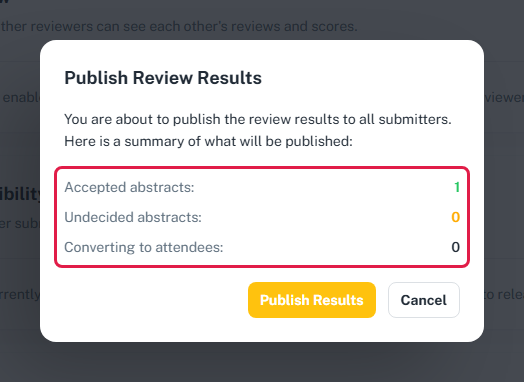
This is one-way
You can publish only once, and you can't hide results again afterwards.
What happens
- Authors see their real decision. Accepted authors also see their average score and reviewer comments. Rejected and waitlisted authors see only the decision.
- Results emails go out to every accepted, rejected and waitlisted author:
- accepted and newly registered – the congratulations email with the payment details and Pay now (paid events);
- accepted and already registered – the congratulations email without payment;
- rejected – "Update on your abstract submission";
- waitlisted – "Your abstract has been waitlisted".
- Accepted authors become presenters:
- Already registered as an attendee: they get the Abstract Presenter role, and their package and payment stay as they were.
- Abstract-only account: they're registered as an attendee in the acceptance package with a new reference number, and they get the Abstract Presenter role. On a paid event, an unpaid payment is created at the package price for the current payment period, and they see a Payment required banner with Pay now when they sign in.
- Submissions lock. No new abstracts and no edits from now on, even if you extend the submission window.
- Poster upload opens for accepted abstracts while the submission window is open, and the Submitted posters page becomes available.
Co-authors don't get emails and aren't made presenters.
Results emails can include the score
The {{abstract_score}} placeholder works in every results template. The default templates don't use it. If you add it to the rejected or waitlisted email, those authors will see their score in the email.