Posters
When authors can upload
An author sees Upload Poster on their abstract only when all of these are true:
- The abstract is Accepted.
- Results have been published.
- The submission form is enabled and the current time is inside the submission window.
Point 3 catches people out: if the submission end date has passed, accepted authors can't upload. Extend the End date under Submission form > Submission limits. That doesn't reopen abstract edits after publishing.
A poster is optional. It has a thumbnail image (JPG or PNG) and a PDF. The first upload needs both, and later uploads can replace either one.
Show posters on the event website
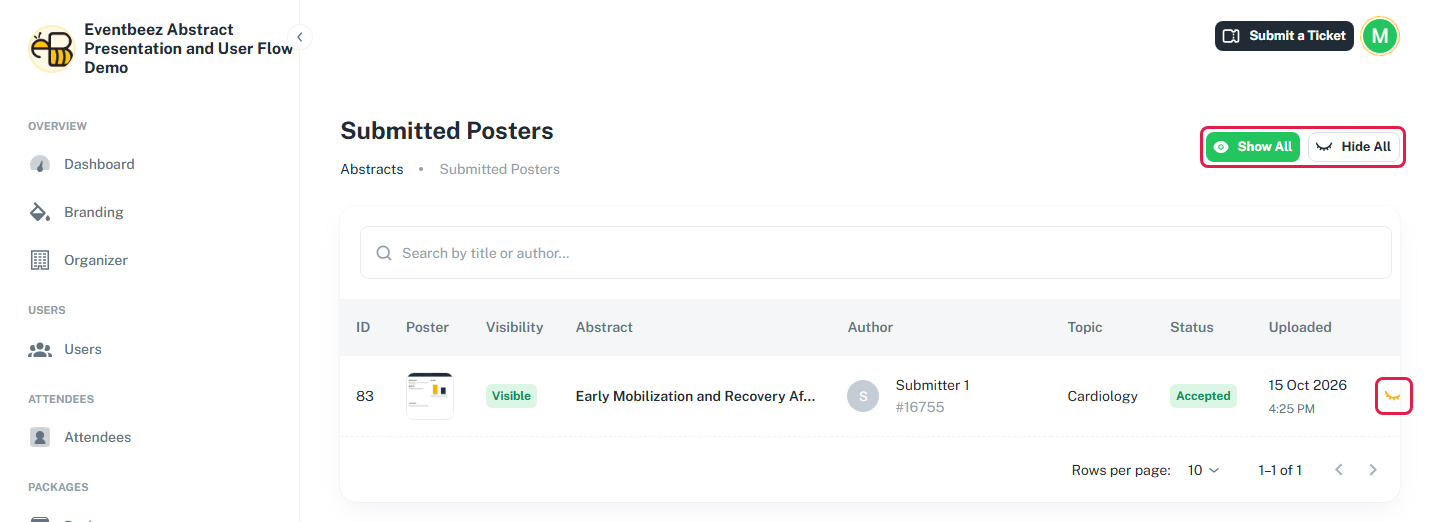
New posters are hidden by default. Go to Abstracts > Submitted posters (available after publishing):
- Use the eye icon on a row to show or hide one poster.
- Use Show All or Hide All to change every poster at once. This changes visibility only, not decisions.
Visible posters appear on the event website's posters page, if the event website has a posters section. You can also show or hide a poster from the abstract's details page.
If you change an accepted abstract to rejected later, its poster stays public until you hide it.